


SAP C_ADBTP認定試験は、業界で大きな需要が発生しています。近年、SAP C_ADBTP証明書は、多くの成功した会社の国際標準となっています。
CertJuken試験資材を使って、あなたのC_ADBTPの試験にパスすることはより簡単です。CertJukenのSAP C_ADBTP試験の資材は、専門家によってテストされて、承認されるほぼ100%の正解を含んでいます。我々の試験資材は、経験豊かな専門家によって書かれます。 だから、最高99.9%のヒット率を持ちます。我々が提供するものによると、あなたは最初の試行でC_ADBTPの試験にパスすることができます。

短時間で試験内容を把握する
CertJukenは、すべての知識点をほとんど含む最も正確で最新の認定試験資材を提供します。 我々の試験資材の助けを借りると、かなりの数の参考書を読んで時間を無駄にする必要がなくて、ただ20〜30時間をかかって我々のC_ADBTP試験問題と回答を把握するだけです。そして、我々はPDFとSOFT版の試験質問と回答を提供します。ソフト版は候補者に現実環境でC_ADBTP試験を模擬することを提供できます。
不合格場合に返金保証
我々社のC_ADBTPの試験資材を使用してから、試験に一回目で失敗した場合に、全額返金を保証します。ただ不合格の証明書をスキャンして、メールの形でCertJukenに送っていいです。確認した後に、こちらはすぐに全額で返金します。
C_ADBTP試験問題集をすぐにダウンロード:成功に支払ってから、我々のシステムは自動的にメールであなたの購入した商品をあなたのメールアドレスにお送りいたします。(12時間以内で届かないなら、我々を連絡してください。Note:ゴミ箱の検査を忘れないでください。)
一年間の無料アップデート
すべての顧客が我々の試験資材を購入した後、我々は一年間無料アップデートを提供します。 一年以内に、もし購入したC_ADBTPの試験資材が更新すれば、こちらは自動にあなたのメールボックスに最新版を送ります。
SAP C_ADBTP 試験シラバストピック:
| セクション | 比重 | 目標 |
|---|---|---|
| トピック 1: SAP Discovery Center および Service Marketplace | <10 | - プロジェクトガイダンスのために SAP Discovery Center を参照し、活用する - SAP BTP Service Marketplace からサービスを検索し、プロビジョニングする |
| トピック 2: SAP BTP アカウントおよびサブアカウント管理 | 11-20 | - ディレクトリおよび環境管理を実装する - グローバルアカウントとサブアカウントを作成および構成する - entitlements、クォータ、および実行環境を管理する |
| トピック 3: SAP BTP サービス | 11-20 | - サービスの稼働状況と使用状況を監視する - サービスを他の SAP システムおよびサードパーティシステムと統合する - SAP BTP プラットフォームサービスをプロビジョニングおよび管理する |
| トピック 4: SAP Business Application Studio / Visual Studio Code | <10 | - SAP Business Application Studio で開発環境を構成し、使用する - ローカル開発のために Visual Studio Code を SAP BTP と統合する |
| トピック 5: 接続性 | 11-20 | - SAP BTP のネットワークおよびトンネリングサービスを管理する - Cloud Connector と Destination の設定を構成し、トラブルシューティングする - SAP BTP とオンプレミスシステム間の接続を設定および管理する |
| トピック 6: DevOps | 11-20 | - SAP BTP サービスを使用してアプリケーションライフサイクルを管理する - SAP BTP アプリケーション向けの CI/CD パイプラインを構成および運用する - アプリケーションとサービスの監視およびアラートを実装する |
| トピック 7: セキュリティ | 11-20 | - SAP BTP の identity and access management (IAM) を構成および管理する - 監査ログとセキュリティ監視を実装する - プラットフォームレベルのセキュリティ設定とポリシーを管理する |
SAP Administrating SAP Business Technology Platform(C_ADBTP_2601) 認定 C_ADBTP 試験問題:
SIMULATION
Create Directories and Subaccounts
In a global account for SAP Business Technology Platform (BTP), create a hierarchy of subaccounts using directories.
Task 1: Create Directories
In your SAP BTP cockpit, create the directory Americas (Description: Americas Accounts) with your global account as the parent.
Create the directory Eurasia (Description: Eurasia Accounts) with your global account as the parent.
Create the directory Partner (Description: Partner Accounts) with the Americas directory as the parent. Add the label access with value external.
Create the directory Human Resources (Description: Human Resources Accounts) with the Eurasia directory as the parent. Add the label access with value internal.
正解:
See the Explanation below for complete solution
Explanation:
Task 1: Create Directories
You need to create these directories:
Americas
Eurasia
Partner under Americas with label access=external
Human Resources under Eurasia with label access=internal
Before You Start
Log in to the SAP BTP Cockpit.
Make sure you are inside the correct Global Account.
Open the left-side navigation menu.
Why this is important:
All directories in this task must be created inside the correct global account hierarchy. If you create them in the wrong location, the simulation result will be incorrect.
Step 1 - Create Directory Americas
What to do
In the SAP BTP Cockpit, select your Global Account.
In the left navigation menu, click Directories.
Click Create or Create Directory.
Fill the fields as follows:
Name: Americas
Description: Americas Accounts
Parent: your Global Account
Click Create.
Explanation:
This creates a top-level directory directly under the global account.
It will later be used as the parent for the Partner directory.
What to verify
After creation, you should see:
Americas
listed under the directories of the global account.
Step 2 - Create Directory Eurasia
What to do
Stay in Directories.
Click Create Directory again.
Fill the fields:
Name: Eurasia
Description: Eurasia Accounts
Parent: your Global Account
Click Create.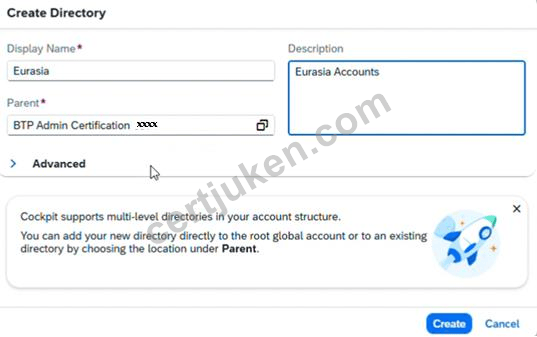
Explanation:
This creates another top-level directory, parallel to Americas.
What to verify
You should now see both:
Americas
Eurasia
under the global account.
Step 3 - Create Directory Partner under Americas
What to do
In the Directories area, select Americas.
Click Create Directory.
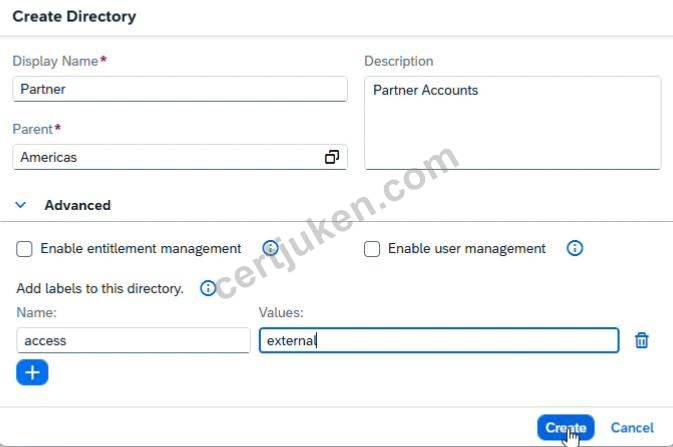
Enter:
Name: Partner
Description: Partner Accounts
Parent: Americas
Locate the Labels section.
Add a new label:
Key: access
Value: external
Click Create.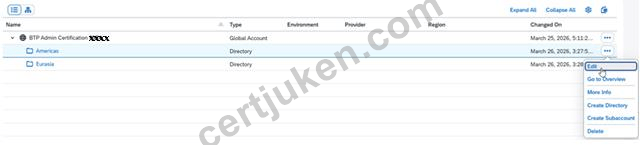
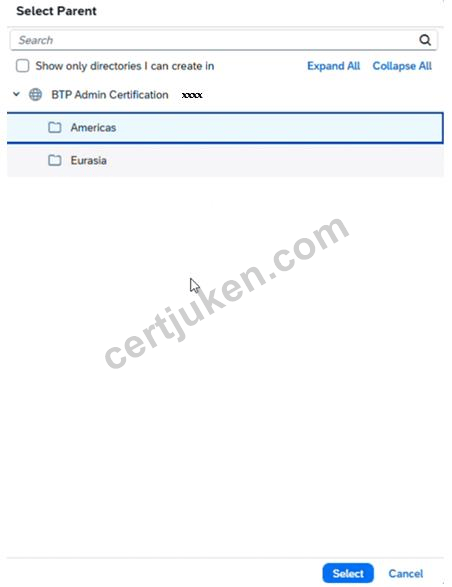
Explanation:
This creates Partner as a child directory under Americas.
The label is required and must be entered exactly:
access = external
This label helps classify the directory.
What to verify
Under Americas, you should now see:
Partner
and the directory should contain the label:
access=external
Step 4 - Create Directory Human Resources under Eurasia
What to do
Go back to the Directories list.
Select Eurasia.
Click Create Directory.
Enter:
Name: Human Resources
Description: Human Resources Accounts
Parent: Eurasia
In the Labels section, add:
Key: access
Value: internal
Click Create.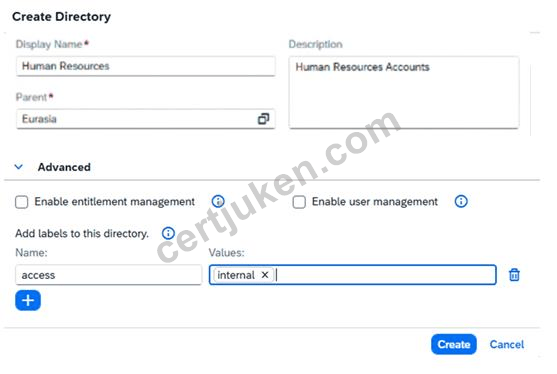
Explanation:
This creates Human Resources as a child directory under Eurasia.
The required label is:
access = internal
What to verify
Under Eurasia, you should now see:
Human Resources
and the label should be:
access=internal
Final Expected Directory Structure
After completing Task 1, your structure must be exactly like this:
Global Account
Americas
Partner
Label: access=external
Eurasia
Human Resources
Label: access=internal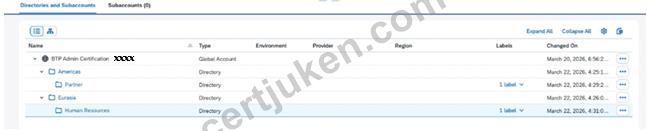
Important Checks Before Moving On
Verify all of the following:
Americas exists
Eurasia exists
Partner is under Americas
Human Resources is under Eurasia
Partner has label access=external
Human Resources has label access=internal
All names and descriptions are entered exactly as required
Common Mistakes to Avoid
1. Wrong parent
Partner must be created under Americas
Human Resources must be created under Eurasia
2. Wrong label key or value
Use exactly:
access → external
access → internal
3. Spelling errors
Be careful with:
Americas
Eurasia
Partner
Human Resources
4. Creating all directories directly under the global account
Only Americas and Eurasia are direct children of the global account.
Partner and Human Resources must be child directories.
 Haseki
 千叶**
千叶**
 Minami
 佐藤**
佐藤**


